Dear STAFF,
Please be advised that these are NEW rules and regulations implemented to raise the efficiency of our firm.
1) TRANSPORTATION:
It is advised that you come to work driving a car according to your salary.
a) If we see you driving a Honda, we assume you are doing well financially and therefore you do not need a raise.
b) If you drive a 10 year old car or taking public transportation, we assume you must have lots of savings therefore you do not need a raise.
c) If you drive a Pickup, you are right where you need to be and therefore you do not need a raise.
2) ANNUAL LEAVE :
Each employee will receive 104 Annual Leave days a year ( Wow! said 1 employee).
- They are called SATURDAYs AND SUNDAYs.
3) LUNCH BREAK:
a) Skinny people get 30 minutes for lunch as they need to eat more so that they can look healthy.
b) Normal size people get 15 minutes for lunch to get a balanced meal to maintain their average figure.
c) Fat people get 5 minutes for lunch, because that's all the time needed to drink a Slim Fast and take a diet pill.
4) SICK DAYS:
We will no longer accept a doctor Medical Cert as proof of sickness.
- If you are able to go to the doctor, you are able to come to work.
5) SURGERY :
As long as you are an employee here, you need all your organs.
- You should not consider removing anything. We hired you intact.
- To have something removed constitutes a breach of employment.
6) INTERNET USAGE :
All personal Internet usage will be recorded and charges will be deducted from your bonus (if any) and if we decide not to give you any, charges will be deducted from your salary.
- Important Note: Charges applicable as Rs.20 per minute as we have 10 MB connection.
Just for information, 73% of staff will not be entitled to any salary for next 3 months as their Internet charges have exceeded their 3 months salary.
Thank you for your loyalty to our company. We are here to provide a positive employment experience.
Therefore, all questions, comments, concerns, complaints, frustrations, irritations, aggravations, insinuations, allegations, accusations, contemplation, consternation and input should be directed somewhere else.
Best Regards,
HRD
Showing posts with label Worth It. Show all posts
Showing posts with label Worth It. Show all posts
Monday, February 12, 2007


Per Minute Salary
*All figures based on media reports*
Indra Nooyi
What: New Pepsi Chief
How much: Rs 2,911 per minute (from October 11)

Chennai-born 50-year-old Indra Nooyi was the Chief Financial Officer (CFO) of PepsiCo, the US-based soft drink major. In that capacity, her remuneration stood at $5 million (over Rs 23 crore). With her promotion this year, Nooyi becomes one of the highest paid CEOs in the world, with an announced remuneration of $33 million (approximately Rs 153 crores). This means Nooyi makes a whopping Rs 2,911 per minute.
Sachin Tendulkar
What: Cricketer
How much: Rs 1,163 per minute
Sachin Tendulkar
What: Cricketer
How much: Rs 1,163 per minute

India's most loved sportsman makes a lot more than most CEOs of Indian companies; going by his annual remuneration for 2004-2005. Breaking it down, his three-year contract for endorsements is worth Rs 180 crores. He is also paid Rs 2,35,000 for a five-day test match and Rs 2,50,000 for one dayers. A little bit of elementary math: This highest paid cricketer in the world makes around Rs 61.15 crore a year, or Rs 1,163 per minute.
Mukesh Ambani
What: CMD of Reliance Industries Ltd
How much: Rs 413 per minute
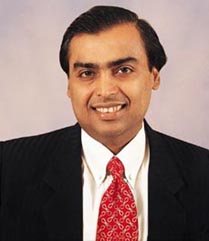
How much: Rs 413 per minute
Head honcho of the $16.5 billion Reliance Industries Limited, Mukesh Ambani was ranked the world's 56th richest man in Forbe's list. But since this is only about salaries (and the like), we'll completely ignore his other earnings. Last year, Mr Ambani earned Rs 21.72 crore; a neat growth of 87 per cent over his previous year's earnings. He makes not less than Rs 413 per minute.
Amitabh Bachchan
What: Actor
How much: Rs 361 per minute
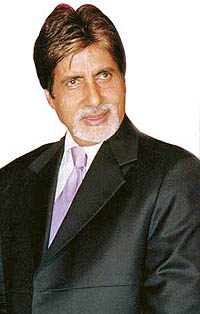
Kaun Banega Crorepati? Apparently, Mr Bachchan! With more endorsements and
film releases per year than successful actors half his age, Bachchan's take-home last year was around Rs 19 crore - that's Rs 361 per minute.
Brij Mohan Lall Munjal
What: Chief of Hero Group
How much: Rs 255 per minute
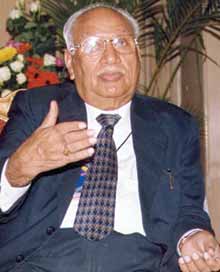
The patriarch of the Hero Group received the Life-time achievement award for 'Excellence in Corporate Governance' by the Institute of Company Secretary of India this year. Brij Mohan Lall Munjal earned about Rs 13.4 crore last year. He continues to be the world's largest motorcycle manufacturer and fuels his bank balance with Rs 255 per minute.
Shah Rukh Khan
What: Actor
How much: Rs 247 per minute
What: Actor
How much: Rs 247 per minute

Shahrukh Khan, who started off modestly as a 'Fauji', made about Rs 13 crore last year. This included his endorsement deals for Pepsi, Hyundai Santro - and of course, wetting himself in a bathtub, surrounded by women for HLL's Lux. How much per minute?
Dr A P J ABDUL Kalam
What: President of India
How much: Rs 1.14 per minute
What: President of India
How much: Rs 1.14 per minute
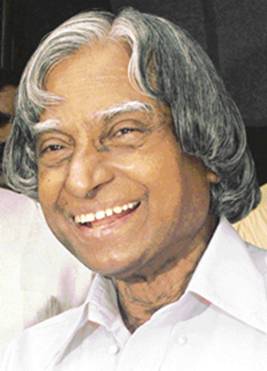
Before taking on the reins of this country, Dr A P J Kalam played a leading role in the development of India's missile and nuclear weapons programmes - so much so - that he's fondly referred to as the 'Missile Man'. In the early 1990s, he served as scientific adviser to the government, and his prominent role in India 's 1998 nuclear weapons tests established Kalam as a national hero. For all his work in his present capacity as President of the world's largest de mocracy, Kalam draws an annual remuneration of Rs 6,00,000 or Rs 1.14 per minute.
Dr Manmohan Singh
What: Prime Minister of India
How much: Rs 0.57 per m inute
What: Prime Minister of India
How much: Rs 0.57 per m inute
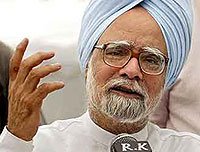
An economist by profession, Dr Singh has formerly served in the International Monetary Fund. His economics education included an undergraduate and a master's degree from Punjab University ; an undergraduate degree from Cambridge ; and a doctorate from Oxford University . One of the most educated Indian prime ministers in history, Singh also served as the finance minister under prime minister Narasimha Rao. In his present capacity, Singh is paid Rs 3,60,000 annually, i.e. Rs 0.57 per minute.


Italian Horoscope
Dear friends there is an Italian horoscope given below. You can find a lot about you by just searching your own identity in Italian way.
What you have to do is to find your group with the help of your date of birth.
Date of Birth Group
01,06,11,16, 21,26,31 A1
02,07,12,17, 22,27 B2
03,08,13,18, 23,28 C3
04,09,14,19, 24,29 D4
05,10,15,20, 25,30 E5
You consider love as the most beautiful thing and you love to fall in love, but a number of your group members think that the person they love is not sincere with them.
You love to be with your friends and you are always found to be a dutiful friend.
You can hardly control your patients, which is a very big drawback of your nature.
The Person who is ruling your mind & heart these days is perfect for you.
Your dreams and ambitions are much important for you and you can do everything to fulfill your dreams. Love is much valuable in your life but you always search for someone perfect. You hardly trust someone.
Your friends are really important for you but normally you hide a lot from them.
You are a deep thinker you always study the negative view as well as positive.
You can lead a happy life with a person for whom you care a lot these days.
You always prefer mantel decisions more then emotional ones due to this you don't have a limited number of friends. You consider life a very beautiful gift and you love to enjoy its colors. There are a number of peoples who are your ideals and you loved to spend a big part of your time with them. You are found to be a very sincere lover.
You have a perfect control on your emotions but sometimes your decisions really effect your beloveds.
The person who has just appeared in your mind and you has decided to forward this mail especially to him/her is your real and special friend.
Your always have goals to achieve and you can do everything to fulfill the dreams of those who loves you.
You have a sketch of an ideal in your mind and you always search for that personality.
Your friends means a lot to you and you can do everything for the sake of your friend, you a normally found to be an emotional personality.
You have a very less control on your patients and due to this sometimes you over react.
The one who sent you this mail & the one to whom you will send this mail first are your real friends.
You are found to be a person who loves to love. You prefer emotional decision more then mantel decisions. You consider life just to enjoy; you are the one who is perfect to call FLURTIES. You love to increase the list of your friends and beloved's. You have a number of dreams but you never work hard to make your dreams come true which is the biggest drawback in your nature you take everything much lightly. With in 7 days you will meet a person whom you have never met before that is the person ideal for you.
Facts : Bill Gates
Facts : Bill Gates

1. Bill Gates earns US$250 every SECOND, that's about US$20 Million a DAY and US$7.8 Billion a YEAR!
2. If he drops a thousand dollar, he won't even bother to pick it up bcoz the 4 seconds he picks it, he would've already earned it back.
3. The US national debt is about 5.62 trillion, if Bill Gates were to pay the debt by himself; he will finish it in less then 10 years.
4. He can donate US$15 to everyone on earth but still be left with US$5 Million for his pocket money.
5. Michael Jordan is the highest paid athlete in US. If he doesn't drink and eat, and keeps up his annual income i.e. US$30 Million, he'll have to wait for 277 years to become as rich as Bill Gates is now.
6. If Bill Gates was a country, he would be the 37th richest country on earth.
7. If you change all of Bill Gate's money to US$1 notes, you can make a road from earth to moon, 14 times back and forth. But you have to make that road non-stop for 1,400 years, and use a total of 713 BOEING 747 planes to transport all the money.
8. Bill Gates is 40 this year. If we assume that he will live for another 35 years, he has to spend US$6.78 Million per day to finish all his money before he can go to heaven.
Last but not the least:
If Microsoft Windows' users can claim US$1 for every time their computers hang because of Microsoft Windows, Bill Gates will be bankrupt in 3 years!!!!!!! !!!!
100 keyboard Shortcut
100 keyboard Shortcut
CTRL+C (Copy)
CTRL+X (Cut)
CTRL+V (Paste)
CTRL+Z (Undo)
DELETE (Delete)
SHIFT+DELETE
(Delete the selected item permanently without placing the item in the Recycle Bin)
CTRL while dragging an item (Copy the selected item)
CTRL+SHIFT
while dragging an item (Create a shortcut to the selected item)
F2 key
(Rename the selected item)
CTRL+RIGHT ARROW (Move the insertion point to the
beginning of the next word)
CTRL+LEFT ARROW (Move the insertion point to the
beginning of the previous word)
CTRL+DOWN ARROW (Move the insertion point to
the beginning of the next paragraph)
CTRL+UP ARROW (Move the insertion point
to the beginning of the previous paragraph)
CTRL+SHIFT with any of the arrow
keys (Highlight a block of text)
SHIFT with any of the arrow keys (Select
more than one item in a window or on the desktop, or select text in a document)
CTRL+A (Select all)
F3 key (Search for a file or a folder)
ALT+ENTER
(View the properties for the selected item)
ALT+F4 (Close the active item,
or quit the active program)
ALT+ENTER (Display the properties of the
selected object)
ALT+SPACEBAR (Open the shortcut menu for the active window)
CTRL+F4 (Close the active document in programs that enable you to have multiple documents open simultaneously)
ALT+TAB (Switch between the open
items)
ALT+ESC (Cycle through items in the order that they had been opened)
F6 key (Cycle through the screen elements in a window or on the desktop)
F4 key (Display the Address bar list in My Computer or Windows Explorer)
SHIFT+F10 (Display the shortcut menu for the selected item)
ALT+SPACEBAR
(Display the System menu for the active window)
CTRL+ESC (Display the Start menu)
ALT+Underlined letter in a menu name (Display the corresponding menu)
Underlined letter in a command name on an open menu (Perform the corresponding command)
F10 key (Activate the menu bar in the active program)
RIGHT ARROW (Open the next menu to the right, or open a submenu)
LEFT
ARROW (Open the next menu to the left, or close a submenu)
F5 key (Update
the active window)
BACKSPACE (View the folder one level up in My Computer or
Windows Explorer)
ESC (Cancel the current task)
SHIFT when you insert a
CD-ROM into the CD-ROM drive (Prevent the CD-ROM from automatically playing)
Dialog Box Keyboard Shortcuts
CTRL+TAB (Move forward through the tabs)
CTRL+SHIFT+TAB (Move backward through the tabs)
TAB (Move forward
through the options)
SHIFT+TAB (Move backward through the options)
ALT+Underlined letter (Perform the corresponding command or select the
corresponding option)
ENTER (Perform the command for the active option or button)
SPACEBAR (Select or clear the check box if the active option is a check box)
Arrow keys (Select a button if the active option is a group of option buttons)
F1 key (Display Help)
F4 key (Display the items in the active list)
BACKSPACE (Open a folder one level up if a folder is selected in the Save As or Open dialog box)
m*cro$oft Natural Keyboard Shortcuts
Windows Logo (Display or hide the Start menu)
Windows Logo+BREAK
(Display the System Properties dialog box)
Windows Logo+D (Display the
desktop)
Windows Logo+M (Minimize all of the windows)
Windows
Logo+SHIFT+M (Restore the minimized windows)
Windows Logo+E (Open My Computer)
Windows Logo+F (Search for a file or a folder)
CTRL+Windows
Logo+F (Search for computers)
Windows Logo+F1 (Display Windows Help)
Windows Logo+ L (Lock the keyboard)
Windows Logo+R (Open the Run dialog
box)
Windows Logo+U (Open Utility Manager)
Accessibility Keyboard Shortcuts
Right SHIFT for eight seconds (Switch FilterKeys either on or off)
Left ALT+left SHIFT+PRINT SCREEN (Switch High Contrast either on or off)
Left ALT+left SHIFT+NUM LOCK (Switch the MouseKeys either on or off)
SHIFT five times (Switch the StickyKeys either on or off)
NUM LOCK for
five seconds (Switch the ToggleKeys either on or off)
Windows Logo +U (Open
Utility Manager)
Windows Explorer Keyboard Shortcuts
END (Display the
bottom of the active window)
HOME (Display the top of the active window)
NUM LOCK+Asterisk sign (*) (Display all of the subfolders that are under the selected folder)
NUM LOCK+Plus sign (+) (Display the contents of the selected folder)
NUM LOCK+Minus sign (-) (Collapse the selected folder)
LEFT ARROW (Collapse the current selection if it is expanded, or select the parent folder)
RIGHT ARROW (Display the current selection if it is collapsed, or select the first subfolder)
Shortcut Keys for Character Map
After you double-click a character on the grid of characters, you can move
through the grid by using the keyboard shortcuts:
RIGHT ARROW (Move to the
right or to the beginning of the next line)
LEFT ARROW (Move to the left or
to the end of the previous line)
UP ARROW (Move up one row)
DOWN ARROW
(Move down one row)
PAGE UP (Move up one screen at a time)
PAGE DOWN
(Move down one screen at a time)
HOME (Move to the beginning of the line)
END (Move to the end of the line)
CTRL+HOME (Move to the first character)
CTRL+END (Move to the last character)
SPACEBAR (Switch between Enlarged and Normal mode when a character is selected)
m*cro$oft
Management Console (MMC) Main Window Keyboard Shortcuts
CTRL+O (Open a saved
console)
CTRL+N (Open a new console)
CTRL+S (Save the open console)
CTRL+M (Add or remove a console item)
CTRL+W (Open a new window)
F5
key (Update the content of all console windows)
ALT+SPACEBAR (Display the MMC window menu)
ALT+F4 (Close the console)
ALT+A (Display the Action menu)
ALT+V (Display the View menu)
ALT+F (Display the File menu)
ALT+O (Display the Favorites menu)
MMC Console Window Keyboard Shortcuts
CTRL+P (Print the current page or active pane)
ALT+Minus sign (-)
(Display the window menu for the active console window)
SHIFT+F10 (Display the Action shortcut menu for the selected item)
F1 key (Open the Help topic, if any, for the selected item)
F5 key (Update the content of all console windows)
CTRL+F10 (Maximize the active console window)
CTRL+F5 (Restore the active console window)
ALT+ENTER (Display the Properties dialog box, if any, for the selected item)
F2 key (Rename the selected item)
CTRL+F4
(Close the active console window. When a console has only one console window, this shortcut closes the console)
Remote Desktop Connection Navigation
CTRL+ALT+END (Open the m*cro$oft Windows NT Security dialog box)
ALT+PAGE UP (Switch between programs from left to right)
ALT+PAGE DOWN
(Switch between programs from right to left)
ALT+INSERT (Cycle through the programs in most recently used order)
ALT+HOME (Display the Start menu)
CTRL+ALT+BREAK (Switch the client computer between a window and a full screen)
ALT+DELETE (Display the Windows menu)
CTRL+ALT+Minus sign (-)
(Place a snapshot of the active window in the client on the Terminal server
clipboard and provide the same functionality as pressing PRINT SCREEN on a local
computer.)
CTRL+ALT+Plus sign (+) (Place a snapshot of the entire client window area on the Terminal server clipboard and provide the same functionality
as pressing ALT+PRINT SCREEN on a local computer.)
m*cro$oft Internet
Explorer Navigation
CTRL+B (Open the Organize Favorites dialog box)
CTRL+E (Open the Search bar)
CTRL+F (Start the Find utility)
CTRL+H
(Open the History bar)
CTRL+I (Open the Favorites bar)
CTRL+L (Open the Open dialog box)
CTRL+N (Start another instance of the browser with the same Web address)
CTRL+O (Open the Open dialog box, the same as CTRL+L)
CTRL+P (Open the Print dialog box)
CTRL+R (Update the current Web page)
CTRL+W (Close the current window)
Recover Ur Happiness
Recover Ur Happiness
A--Accept
Accept others for who they are and for the choices they've made even if you have difficulty understanding their
beliefs, motives, or actions.
B--Break Away
Break away from everything that stands in the way of what you hope to accomplish with your life.
C--Create
Create a family of friends whom you can share your hopes, dreams, sorrows, and happiness with.
D--Decide
Decide that you'll be successful and happy come what may, and good things will find you. The roadblocks are only minor obstacles along the way.
E--Explore
Explore and experiment. The world has much to offer, and you have much to give. And every time you try something new, you'll learn more about yourself.
F--Forgive
Forgive and forget. Grudges only weigh you down and inspire unhappiness and grief. Soar above it, and remember that everyone makes mistakes.
G--Grow
Leave the childhood monsters behind. They can no longer hurt you or stand in your way.
H--Hope
Hope for the best and never forget that anything is possible as long as you remain dedicated to the task.
I--Ignore
Ignore the negative voice inside your head. Focus instead on your goals and remember your accomplishments. Your past success is only a small inkling of what the future holds.
J--Journey
Journey to new worlds, new possibilities, by remaining open-minded. Try to learn something new every day, and you'll grow.
K--Know
Know that no matter how bad things seem, they'll always get better. The warmth of spring always follows the harshest winter.
L--Love
Let love fill your heart instead of hate. When hate is in your heart, there's room for nothing else, but when love is in your heart, there's room for endless happiness.
M--Manage
Manage your time and your expenses wisely, and you'll suffer less stress and worry. Then you'll be able to focus on the important things in life.
N--Notice
Never ignore the poor, infirm, helpless, weak, or suffering. Offer your assistance when possible, and always your kindness and understanding.
O--Open
Open your eyes and take in all the beauty around you. Even during the worst of times, there's still muc h to be thankful for.
P--Play
Never forget to have fun along the way. Success means nothing without happiness.
Q--Question
Ask many questions, because you're here to learn.
R--Relax
Refuse to let worry and stress rule your life, and remember that things always have a way of working out in the end.
S--Share
Share your talent, skills, knowledge, and time with others. Everything that you invest in others will return to you many times over.
T--Try
Even when your dreams seem impossible to reach, try anyway. You'll be amazed by what you can accomplish.
U--Use
Use your gifts to your best ability. Talent that's wasted has no value. Talent that's used will bring unexpected rewards.
V--Value
Value the friends and family members who've supported and encouraged you, and be there for them as well.
W--Work
Work hard every day to be the best person you can b e, but never feel guilty if you fall short of your goals. Every sunrise offers a second chance.
X--X-Ray
Look deep inside the hearts of those around you and you'll see the goodness and beauty within.
Y--Yield
Yield to commitment. If you stay on track and remain dedicated, you'll find success at the end of the road.
Z--Zoom
Zoom to a happy place when bad memories or sorrow rears its ugly head. Let nothing interfere with your goals. Instead, focus on your abilities, your dreams, and a brighter tomorrow.
Subscribe to:
Posts (Atom)